Explanation
How a rule turns into posts
When a rule prepares each day's posts, how it picks the times and the products for each account, and where the posts go.
Once a rule is on, SemPost prepares its days by itself, a while before each day begins. This page follows one day of a rule that posts on a schedule; a rule that posts when something happens in your store works the same way once a product is waiting (post when something happens in your store).
When a day is prepared
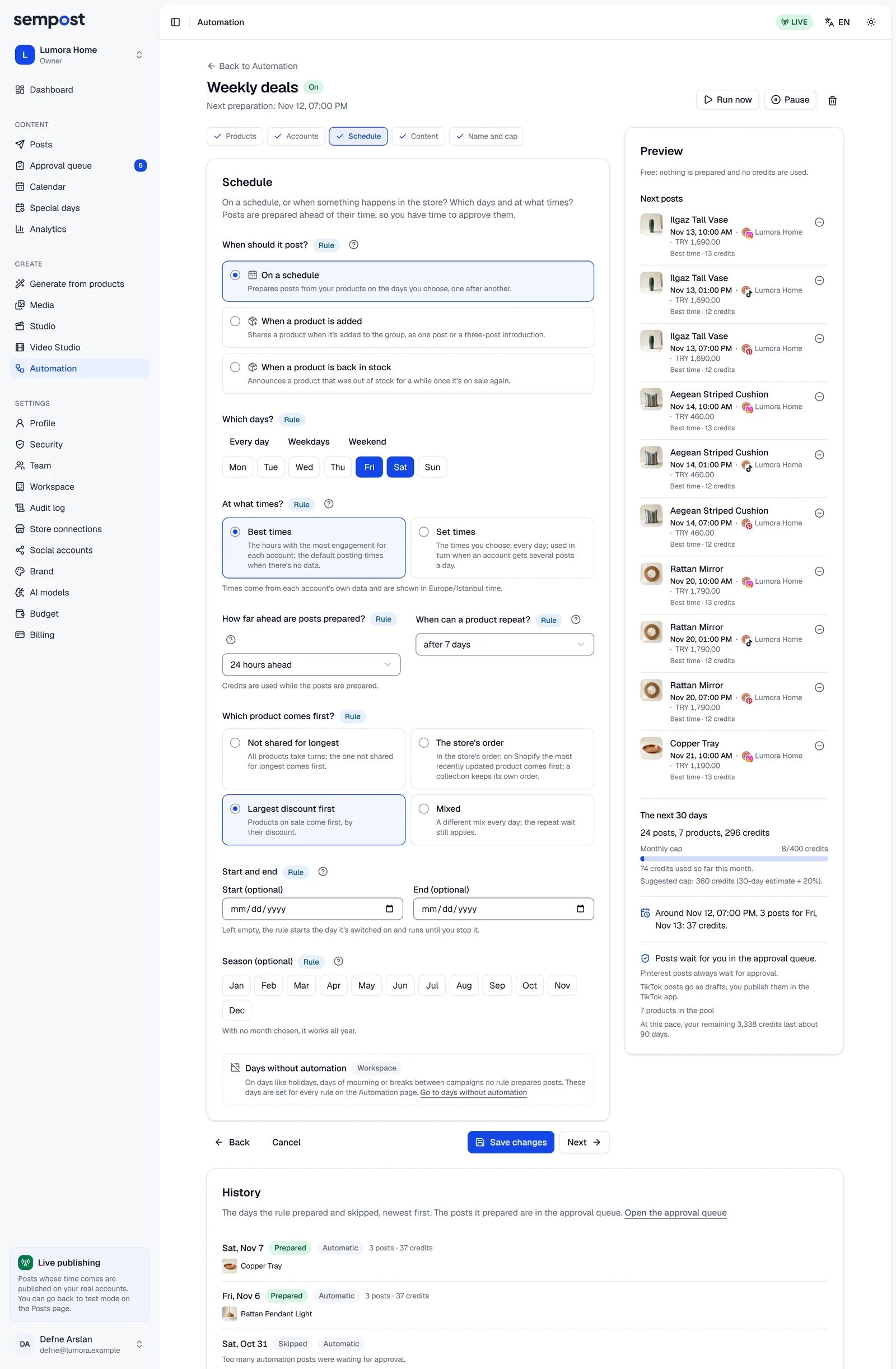
All of a day's posts are prepared at once, ahead of the day: at the day's start (midnight in your workspace's time zone) minus the rule's How far ahead are posts prepared?. Each rule adds a delay of its own, under an hour, so that rules don't all start at the same moment. With 24 hours, Tuesday's posts are prepared in the first hour of Monday, which leaves you at least a day to approve them.
- A rule prepares days from tomorrow on. Only Run now fills today.
- It prepares one day at a time. When several days are due at once, for example when you switch on a rule set to 72 hours, they're prepared one after another, a few minutes apart.
- It leaves out the days that aren't among its days, days before its start or after its end, months outside its season and the workspace's days without automation.
- Credits are used when the posts are prepared, not when they're published.
Accounts and times
Every account in the rule takes part, unless it's disconnected, was stopped after failing several times in a row, or is a YouTube channel or a Google Business Profile without the rule's consent (networks that always need a person); the rule goes on without it. Each account gets its Posts a day, as far as its free times allow:
- Best times: the account's own best hours for that day of the week, up to three, or the default posting hours when there isn't enough data.
- Set times: your times, in order.
A time is free when the account stays under its network's daily count and 4 hours away from its other posts, those written by hand and other rules' posts included. When fewer times are free, the account gets fewer posts that day; the preview warns you ahead. See time zones, best times and daily limits.
Which products
The rule starts from its pool:
- a group as the store lists it at that moment, up to 500 products;
- picked products, each read again from the store;
- product page addresses, each page read again. A page that can't be read is left out that day, for free.
It leaves out the products you took out of the rule, products the store no longer sells (on Shopify a draft or archived product, on WooCommerce one no longer published), products without a photo and, when Skip products out of stock is on, products out of stock. A product with no page on the store's website is still posted, without a link to it.
Then, for each account, it leaves out a product that:
- was published on that account within When can a product repeat?, counted from the day it was published, not from when its post was made. A post validated in test mode counts as published.
- already has a post on its way to that account: a draft, waiting for approval or planned, whoever made it.
Other accounts aren't affected. A product in its repeat wait is never picked, even when nothing else is left: the account gets fewer posts that day instead.
The products left are put in the rule's order:
- Not shared for longest: products never shared on the rule's accounts first, then the one shared longest ago. A product new to the group moves ahead of those already shared; a product whose post was rejected goes to the back.
- The store's order: as the store lists them. On Shopify that's the most recently updated first, or a collection's own order. Picked products and addresses keep the order you added them in.
- Largest discount first: products on sale, the largest discount first, then the others.
- Mixed: a different mix every day.
One product, several accounts
The rule takes the products in order and gives each one to every account that still needs a post that day and may have it. The texts for all those accounts are written in one AI call and one scene picture serves them all, so a product on three accounts costs one product's price.
- Each account's first product takes its first free time, its second product the second time, and so on.
- The rule posts a product once a day at most, even when two addresses lead to it.
- The same product's posts on two accounts are moved at least 30 minutes apart, when the accounts' other posts allow it.
If the day costs more than the rule's monthly cap leaves, products are dropped from the end of the day's list: see credits and the monthly cap.
Where the posts go
The posts follow your workspace's approval rule. With Only what the AI and automation write (recommended) or Also what editors write, they wait in the Approval queue with the time the rule chose, and a post approved before that time goes out at that time. With None, they're planned at that time without approval.
Whatever the approval rule, Pinterest and LinkedIn posts wait for approval, TikTok posts reach TikTok as drafts, and YouTube and Google Business Profile only take posts with your consent (the networks' rules). A post still waiting for approval two hours after its time expires instead of going out late (checks before posting). Each post carries Automation · and the rule's name (a rule's history).
In test mode
The AI writes and draws for real in test mode too, so preparing uses credits. At their time the posts are only validated. A product whose post was validated in test mode counts as shared for the repeat wait, so the rule doesn't go back to the same products when you switch to live mode.
A day that can't be prepared
The day is skipped, and the rule's history says why. When the reason can soon go away, such as a store connection to renew, the rule tries again every hour until the day begins. See rule statuses and warnings.