Explanation
Networks that always need a person
Why a rule's Pinterest and LinkedIn posts always wait for approval, TikTok posts arrive as drafts, and YouTube and Google Business Profile need your consent.
Some networks don't let an app post on its own: a person has to approve each post, publish it, or give consent first. A rule follows these terms by itself, whatever your workspace's approval rule says. You see each network's rule on the account's card in the rule's Accounts step, and on the rule's card on the Automation page.
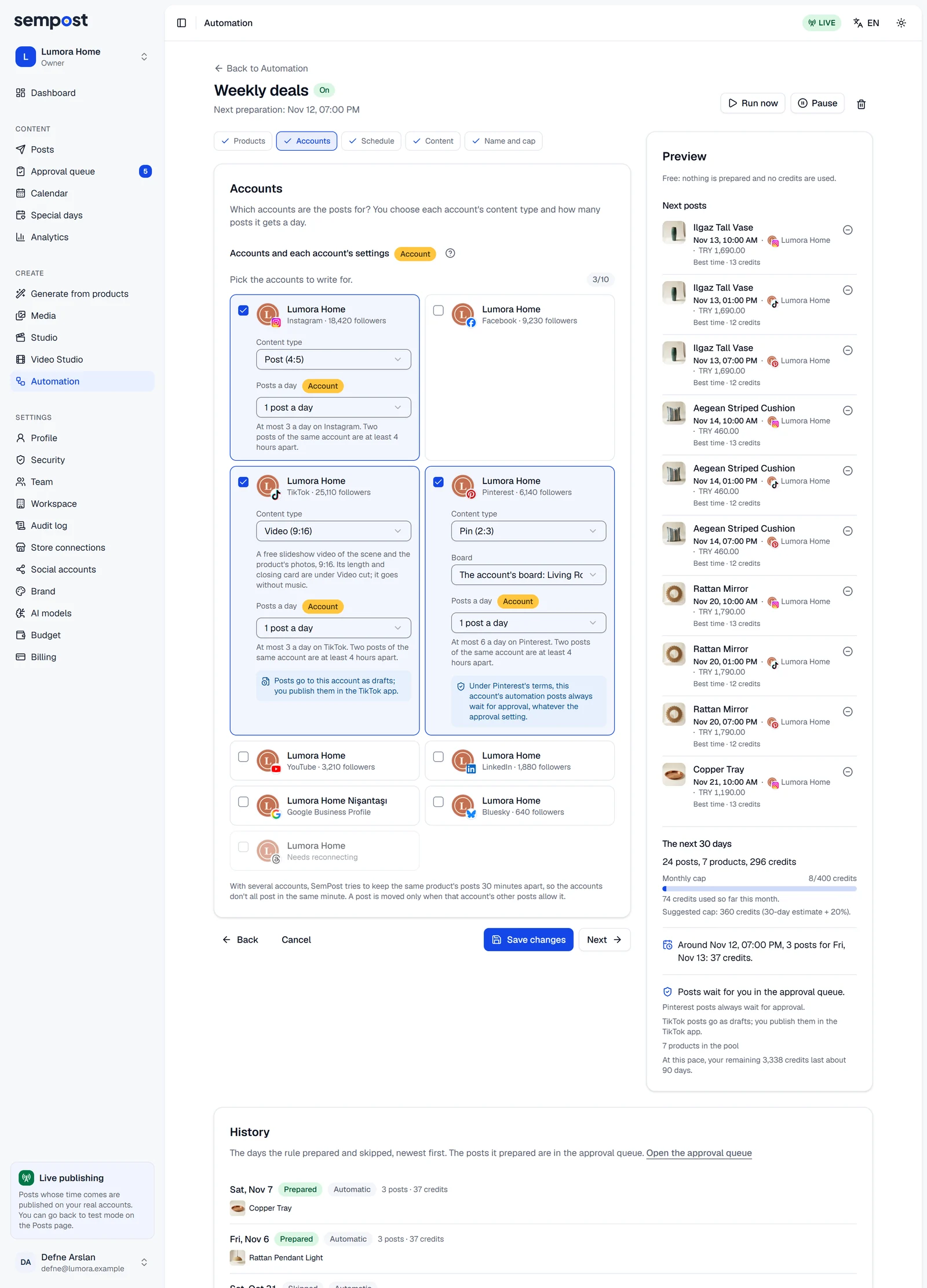
Network by network
| Network | What a rule does | On the rule's card |
|---|---|---|
| Pinterest, LinkedIn | Every post waits in the Approval queue, even when the approval rule is None. | Always waits for approval |
| TikTok | After approval, when your approval rule asks for it, the post reaches the TikTok app as a draft at its time. You publish it there. | As a draft |
| YouTube | Videos are uploaded only after you give your consent in the rule. | With your consent |
| Google Business Profile | Posts are published only after you give your consent in the rule. | With your consent |
| Instagram, Facebook, Threads, Bluesky | Your workspace's approval rule decides. |
Always waits for approval means each post needs a person's approval; none is approved by itself. That holds for a draft too: a Pinterest or LinkedIn post that went back to the Drafts tab (a safeguard held it, or Pause all took it back) goes to the Approval queue when you send it on. Its button says Send for approval, not Plan, even when the approval rule is None. The rule's preview says it too, under Where the posts go: for example Pinterest and LinkedIn posts always wait for approval. and TikTok posts go as drafts; you publish them in the TikTok app.
Why
- Pinterest: its rules for apps say that when an app lets you schedule Pins, you choose each Pin that is published.
- LinkedIn: its API terms don't allow apps to automate posting.
- TikTok: publishing straight to TikTok needs your own choices for each post, so a rule never does it.
- YouTube and Google Business Profile: their rules for apps ask for your prior, specific and express consent before an app uploads or posts for you automatically.
Give your consent for YouTube or Google Business Profile
When you add a YouTube account to a rule, its card in the Accounts step shows a box: I consent to SemPost uploading this rule's videos to the YouTube account I chose automatically. For a Google Business Profile it reads I consent to SemPost publishing this rule's posts to the Google Business Profile I chose automatically. Tick it before you save.
- Without it, the rule can't be saved: Before you save lists Give your consent for YouTube uploads. or Give your consent for Google Business Profile posts., with a link to the step.
- SemPost keeps who gave the consent, when, and for which version of the text. Afterwards the card says Your consent for YouTube uploads is on record.
- Consent belongs to the rule: a channel that is in two rules needs it in each.
- To stop the uploads, take the account out of the rule and save.
A rule saved before the consent was asked
A rule saved before Google Business Profile asked for its own consent has none on record. Until it has, the profile gets nothing from that rule; the rule's other accounts go on.
- On the Automation page, the profile's line on the rule's card says Needs your consent instead of With your consent.
- The rule's preview warns: … gets no posts: the rule has no consent on record for its automatic posts.
- A post the rule had already prepared for the profile isn't sent: it fails with Not sent: the rule that prepared it has no consent on record for this account's automatic posts. …
- To give the consent, press Edit on the rule's card, tick the box on the profile's card in the Accounts step and save. The next days the rule prepares include the profile again.
YouTube: content made for kids
Every YouTube channel also needs one confirmation of its own: This channel does not publish content made for kids. It's given when the channel is connected; for a channel connected earlier, an owner or admin presses Confirm in Settings › Social accounts, then Not made for kids. SemPost tells YouTube on every upload that the video isn't made for kids, and sends nothing to the channel until this is confirmed. See the YouTube article for more.
If something goes wrong
- YouTube uploads need your consent: confirm that SemPost may upload this rule's videos to YouTube. Tick the box on the YouTube account's card in the Accounts step, then save again.
- Automatic Google Business Profile posts need your consent: confirm that SemPost may publish this rule's posts to your Business Profile. Do the same on the profile's card.
- Not sent: confirm in Settings › Social accounts that this YouTube channel does not publish content made for kids. An owner or admin confirms it there with Confirm and Not made for kids. The channel's next posts go out.
- Not sent: the rule that prepared it has no consent on record for this account's automatic posts. Give it on the account's card in the rule's Accounts step. The rule was saved before the network asked for consent: give it as described above. The rule's next posts for the account go out.
- A TikTok post doesn't show on the profile. It's waiting in the TikTok app as a draft: open the app, finish the post and publish it.