How-to guide
Post when something happens in your store
Share a product when it's added to your store or comes back in stock, with the same accounts, times, cap and approval as any rule.
Instead of posting on a schedule, a rule can post when something happens in your store: when a product is added, or when a product is back in stock. Everything else works as in any rule: the accounts, the content, the days and times, the monthly cap, approval and the safeguards.
Set it up
Choose a store group
In the Products step, choose A group in the store: all products, a collection, a tag and so on. An event rule watches a group; picked products and product page addresses gain no new products, so they can't be chosen.
Choose the trigger
In the Schedule step, under When should it post?, choose When a product is added or When a product is back in stock. When the products don't come from a group, these two are off, and Go to the Products step takes you back.
Set the trigger
- For a new product, How long should it wait?: from No wait to 72 hours. The 6 hours it starts with leave you time to finish the product's photos and description. Then How many posts?: One post, or A three-post introduction, posted on the first day it can be, 3 days later and 7 days later, each from another angle.
- For a product back in stock, How long must it have been out of stock?: from 1 to 30 days, 3 to start with, so brief gaps make no post.
Choose the days and times, then switch it on
On which days may it post? and At what times? work as in any rule. For back in stock, we suggest 30 days under When can a product repeat?, so a product that often runs out isn't shared every time. There's no order to choose: the first event found goes first. When you switch the rule on, the dialog says what its first reading does and about how many credits one event takes.
How the rule watches the group
- The first reading. When you switch the rule on, it reads the group and treats every product in it as known: no posts for products already there. The same happens when you switch it on again after a pause, so what came in meanwhile doesn't pile up. Changing where the products come from, or the trigger, starts the watch again and drops the posts still waiting.
- Then about once an hour, it reads the group again. In a group of more than 500 products, it watches the first 500 the store lists: on Shopify, the most recently updated, or the first in a collection's own order.
- A new product is one the rule hasn't seen before and the store added in the last 7 days. A product long in the store that joins the group later isn't new.
- Back in stock means a product the rule saw out of stock is in stock again, after at least the time you chose, counted from the reading that first found it out of stock.
When the posts go out
- On the rule's days and at its times, from the day after the event on. If the event happens on a day the rule doesn't post, the post waits for the next day you chose. An event found later than How far ahead are posts prepared? has its post prepared as soon as it's found.
- Each product goes to every account with a free time that day. A post that finds no place, or comes while the monthly cap is full, waits for a later day; one still waiting 7 days after its first possible day is dropped.
- Before a post is prepared, the product is read again: out of stock (when the rule skips those), without a photo or no longer sold by the store (a draft or archived product), it waits.
- The second and third posts of an introduction don't wait for the repeat wait, but they do wait while the product's previous post on that account is still waiting for approval or planned.
- An event rule has no Run now: its days come from the events.
Credits and the cap
One event costs about one product's posts on all the rule's accounts, times the posts in its series: the preview shows it under One event's credits. Events can't be foreseen, so there's no monthly estimate. You choose the cap; the suggested one is for 8 events a month. See credits and the monthly cap.
What you see
The rule's card shows the trigger and its settings, how many products it watches and how many posts are waiting, or Waiting for its first reading. Under the rule's name: Watching the products. Next look: ….
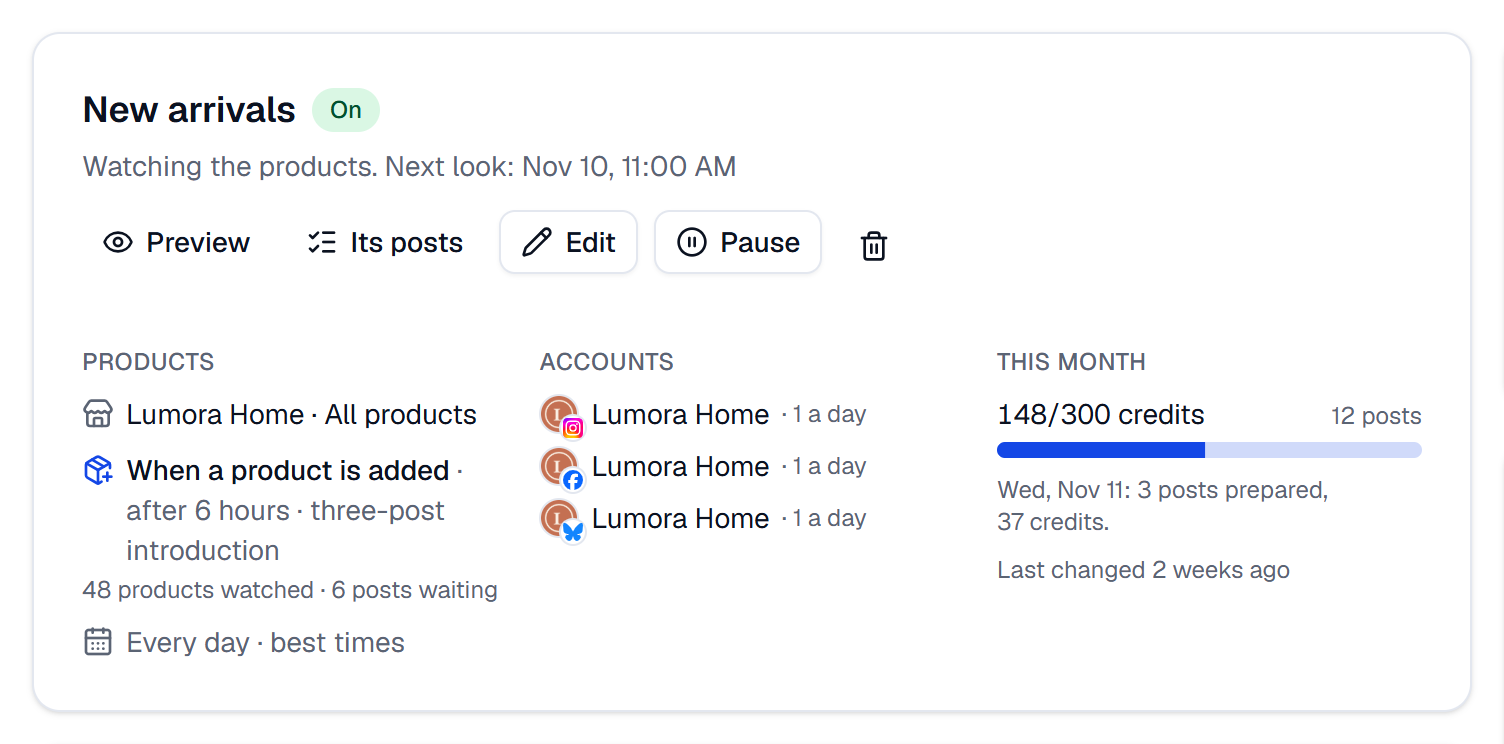
In the preview, Posts waiting lists each product, its post number and the day it goes out. In the history, each product is marked, for example New product · post 1 or Back in stock.

If something goes wrong
- A new product wasn't posted. It was already in the group at the rule's first reading, the store added it more than 7 days before the rule found it, it's beyond the 500 products watched, or it's out of stock or has no photo.
- A product back in stock wasn't posted. It was out of stock for less than the time you chose, the rule never saw it out of stock, or it was shared on that account within the repeat wait.
- No day it can post in the next 30 days under a waiting post: the rule's days, season or end date, or the workspace's days without automation, leave no day. Change the days in the Schedule step.