How-to guide
Have short videos made automatically
Let an automation rule make a short video of one of your products for each day it prepares; choose the right video type and know the three-hook package's days and the credits before you start.
An automation rule can make short videos instead of posts. For each day it prepares, it makes a vertical video of one of your products: your product photos, on-screen text, voiceover, music and a closing card with the price. The video goes to the accounts you chose for the rule (such as Instagram Reels, TikTok and YouTube Shorts). For example, a home decor shop can have a Reels video made for every new product added to its store, and a cosmetics brand can have a video of one of its products made every weekday.
Videos always wait for your approval in the approval queue: whatever your workspace's approval rule, no video is shared before you approve it. The video is made the same way as the Studio's short video and paid for at the same price.
Setting up the rule
On Automation, press Create rule. The form's first step is What it makes. The other steps are the same as in every rule: see Create your first automation rule.
Choose short video
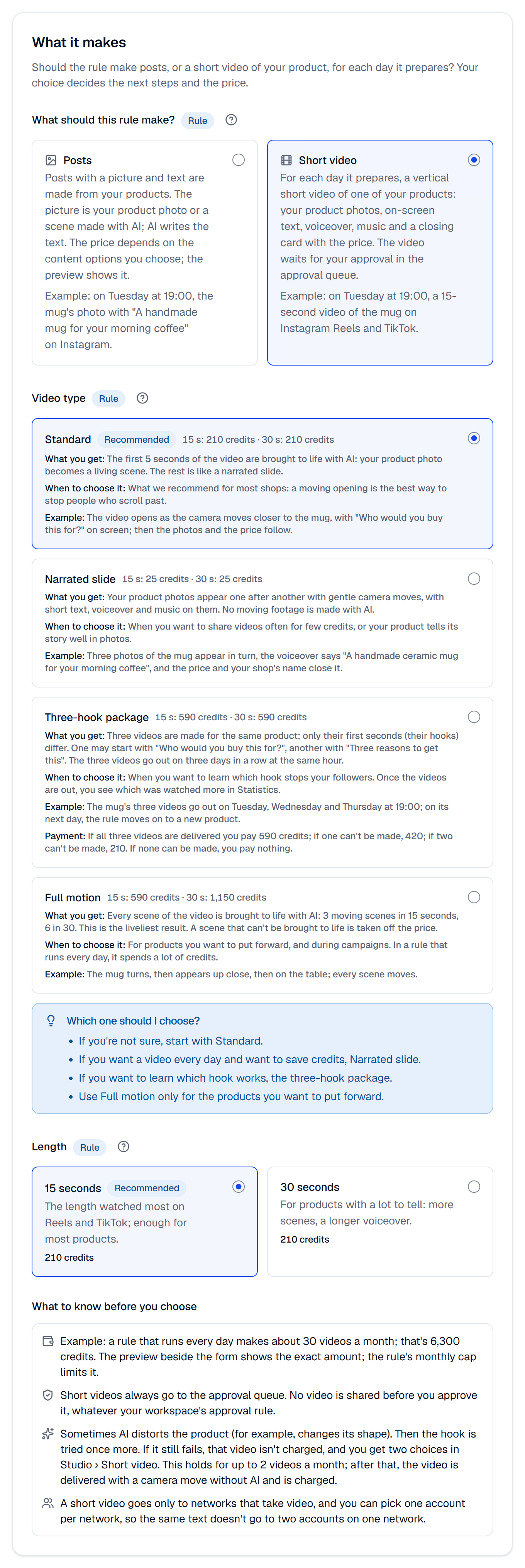
Under What should this rule make?, choose Short video. The video types and the length open below it. If short videos aren't open in your workspace, the choice is shown off. A special day's greeting is always made as a post.
Choose the video type
The video type decides how much of the video AI brings to life, and its price. Each card says what you get, when to choose it, an example and its price for 15 and 30 seconds.
| Video type | What you get | When to choose it | Price (15 / 30 s) |
|---|---|---|---|
| Standard | The first 5 seconds come to life with AI; the rest is told with your photos | What we recommend for most shops: a moving opening stops people who scroll past | 210 / 210 credits |
| Narrated slide | Your photos with gentle camera moves, text, voiceover and music; no AI motion | When you want frequent videos for few credits | 25 / 25 credits |
| Three-hook package | Three videos of the same product, only their first seconds differ; shared on three days in a row | When you want to learn which hook stops your followers | 590 / 590 credits |
| Full motion | Every scene comes to life with AI (3 scenes in 15 seconds, 6 in 30) | For products you want to put forward, and for campaigns | 590 / 1,150 credits |
The Which one should I choose? box sums it up: if you're not sure, start with Standard; if you want a video every day and want to save credits, Narrated slide; if you want to learn which hook works, the Three-hook package; use Full motion only for the products you want to put forward.
In the three-hook package you pay Standard's price for each video delivered: 590 credits if all three are delivered, 420 if one can't be made, 210 if two can't be made, and nothing if none can be made. Special day rules don't offer the three-hook package, because the videos could go out after the day.
Choose the length
15 seconds is the length watched most on Reels and TikTok and is enough for most products. 30 seconds is for products with a lot to tell: more scenes and a longer voiceover. Only Full motion's price changes with the length.
The What to know before you choose list at the end of the step gives a monthly example (a rule that runs every day makes about 30 videos a month, or 10 three-hook packages) and reminds you of the rules below.
Choose the products, accounts and timing
The Products and Schedule steps are the same as in a posts rule. In the Accounts step you can pick accounts only on networks that take video, one account per network, so the same text doesn't go to two accounts on one network. A network that takes no video says This network takes no short video on its card, and a second account says An account of this network is already picked. An X account can't be picked either: its card says Short video rules don't post to X yet. To share a short video on X, make it in the Studio (Make a short video). Each account shares the video in its network's video type (Reels on Instagram and Facebook, a video on TikTok); one video goes out for each day the rule prepares.
In a rule that works with the new products in your store, one video is made for each new product; the three-post series of posts rules doesn't apply to short videos.
Choose the content
The Content step asks how the video tells your product. Automatic is the recommended choice: new products open with "Just in", special days with "Who would you buy this for?", and on other days the formats change in turn, so no two days look like the same video. You can also pick one format; each format's card shows a sample hook.
Voiceover voice is the voice that reads the video's voiceover. With Also make the swipe twin on, the video is also told as cards (for Instagram, Facebook, Threads, LinkedIn and Bluesky, not TikTok); the price doesn't change.
AI writes the video's text and the post's text from your product's details. Automation's rules apply here too: no former price, sale, deadline or claim that can't be proven, such as "the best"; the closing card shows the price (No misleading prices).
Set the name and the cap
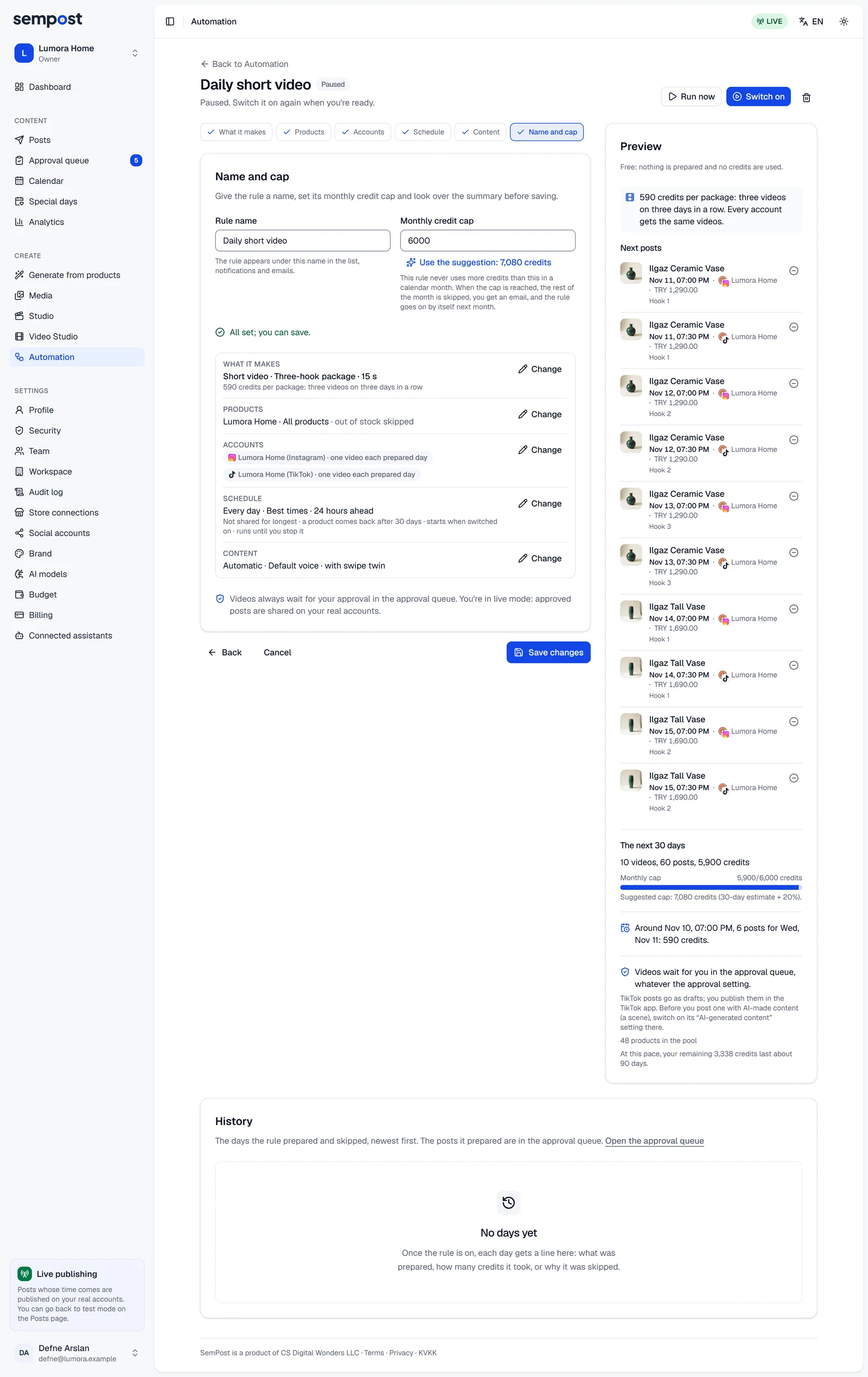
SemPost suggests a name such as "Short video · All products · Every day" and a Monthly credit cap from the preview. The cap can't be below one video's price, because the rule could never make a video.
The three-hook package's days
A product's three videos go out on three days in a row at the same hour. The rule moves on to a new product on its first day after the third video, so every account shares one video a day. For example, a Monday–Friday rule that starts on Monday shares the videos on Monday, Tuesday and Wednesday; the next product's package starts on Thursday and its videos go out on Thursday, Friday and Saturday.
If there is a day without automation posts in between, that day is skipped and the video moves to the next day. If the account has another post at the same hour, the video goes to that day's first free time; with none free, you choose the time when you approve it.
Once all three videos have gone out, the package's Hook report shows which hook won: the first result comes 72 hours after the third video, the final one 7 days after. See Which hook won?
When the videos are shared
- The rule prepares the day ahead; the video is made within minutes and its posts land in the approval queue with each account's time. Once you approve them, they go out on time.
- If you pause the rule or all automation while the video is being made, its posts arrive as drafts without a time; you send them on yourself.
- The swipe twin goes to the approval queue without a time; you choose when to share it when you approve it.
- On TikTok the video goes as a draft, like every automation post, and you publish it in TikTok.
Credits and the cap
The video's price is set aside from the rule's monthly cap and your credits when the day is prepared; the cap is checked against the full price, so a 1,150-credit video that would go over the cap isn't prepared. The video is paid for once it's delivered; if it can't be made, the credits set aside are freed. If AI distorts the product, the hook is tried once more; if it still fails, that video isn't charged. This holds for up to 2 videos a month (5 on Pro and Agency); after that, the video is delivered with a camera move without AI and is charged. More: Credits and the monthly cap.
Preview and Run now
The preview beside the form shows the next 30 days' videos and their price: the credits per video (per package for the three-hook package) at the top, and each account's posts in the list with labels such as Hook 1 and Hook 2. Run now makes the video of the rule's next day at once (Preview and Run now).
Following the video
In the rule's History, a day with a video shows a short video tag and an Open short videos link. On the Studio › Short video page, a video automation made says Automation rule: … on its card; there you watch it, fix its voiceover and, if its hook couldn't be made, get its choices.
With an AI assistant
A connected AI assistant can't write or switch on a short video rule; you set it up and switch it on in SemPost. An assistant can change a paused short video rule's other settings, and the rule stays a short video rule. If an assistant asks to switch one on, the confirmation page says An assistant can't do this; you do it in SemPost.
If something goes wrong
- The monthly cap is below one video's price (… credits): the rule could never make a video. Raise the cap to at least that. Raise the cap in the Name and cap step.
- This network takes no short video or An account of this network is already picked. Pick accounts on networks that take video, one per network.
- Short video rules don't post to X yet. Remove this account or choose Posts. / A short video rule can't post to X yet. … The rule has an X account: take it out in the Accounts step, or choose Posts. A short video you make in the Studio can go to X.
- The three-hook package isn't available for special day rules: choose another video type.
- Short videos aren't open in your workspace: choose Posts.
- The rule stopped saying The rule's video type can't be made any more: short videos were closed for your workspace, or the type you chose isn't on your plan. Choose another video type for the rule or move to a bigger plan, then switch the rule on again.