Explanation
Plans and what they include
What each plan gives your workspace, how its limits count, where you see what you use, and how the free trial works.
Every workspace is on a plan. The plan decides how many credits load each month and how far the workspace can grow: social accounts, stores, seats for your team, active automation rules, the analytics period and the media library. Prices are on the pricing page.
What each plan includes
| Trial | Starter | Growth | Pro | Agency | |
|---|---|---|---|---|---|
| Credits each month | 150 | 800 | 2,000 | 5,000 | 12,000 |
| Social accounts | 2 | 2 | 5 | 10 | 25 |
| Stores | 1 | 1 | 2 | 5 | 15 |
| Team members | 3 | 1 | 3 | 8 | 20 |
| Automation rules | 2 | 2 | 10 | 30 | Unlimited (fair use: up to 100 switched on) |
| Analytics history | 30 days | 30 days | 90 days | 365 days | 365 days |
| Media library | 1 GB | 1 GB | 5 GB | 10 GB | 20 GB |
Credits pay for AI work, such as writing posts and making scenes or motion clips: How credits work explains them. In the Trial column, the credits are for the trial's 7 days, not for a month.
How the limits count
- Social accounts: every connected account, including one waiting to be reconnected. Extra social accounts you buy add to your plan's.
- Stores: every store connection.
- Seats: members and pending invitations, Shopify staff who joined from the Shopify admin included. An expired or revoked invitation frees its seat.
- Active automation rules: only rules that are on; paused rules don't count. Agency's unlimited rules have a fair-use ceiling of 100 active rules.
- Media library: the files saved in Media, the trash included.
- Analytics period: how far back Analytics goes.
Reaching a limit removes nothing. SemPost just doesn't add more, and its message names the limit that is full.
Your plan and what you use
The Plan and use card in Settings › Billing shows each limit and what you use of it, such as 9 / 10, with full beside a limit you've reached. It shows what you can use now: extra accounts you bought are included, and while a smaller plan waits for its first day, its limits for accounts, stores, seats and rules already count.
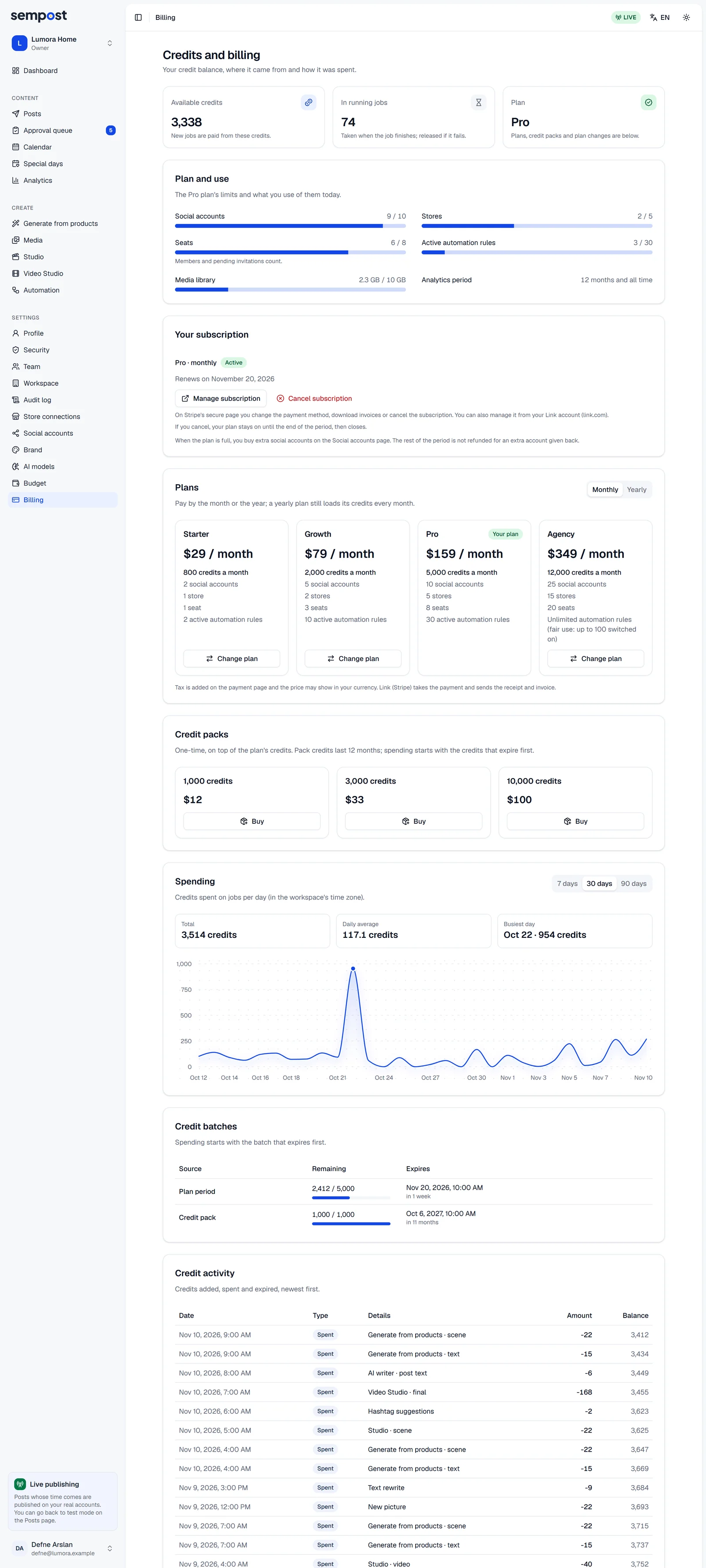
Everyone in the workspace sees this page. Only the owner buys or changes the plan.
Locked analytics periods
Analytics shows the periods your plan covers. A longer period shows a lock, and the line under the period buttons names the plan that opens it, such as "90 days with Growth". Plans with 12 months also open All time.
The free trial
The first workspace you create starts a 7-day free trial, and no card is asked for. It gets the trial's credits and limits, shown in the Trial column above. The Plan tile at the top of Settings › Billing shows when the trial ends.
The trial comes once per person, even after that workspace is deleted or moves to a plan. A workspace you create later starts without a plan and says This workspace has no plan yet: nothing is generated, automated or published there until you buy one.
- Credit packs are for workspaces on a plan, so they can't be bought during the trial.
- Buying a plan ends the trial at once. Trial credits you have left stay until the day the trial would have ended.
- When the trial ends without a plan, its unused credits expire, and the workspace's social accounts are disconnected 48 hours later. Buy a plan to go on.
A workspace from the Shopify App Store gets its trial with the plan chosen in Shopify: see Paying through Shopify.
Moving to another plan
A bigger plan's limits apply at once. A smaller plan starts at the end of the period you paid for, once what doesn't fit is removed: see Change your plan.
If something goes wrong
- All … social accounts in your plan are in use. Remove an account, or the owner buys an extra social account or a bigger plan.
- All … stores in your plan are in use. Remove a store connection, or move to a bigger plan.
- Your plan's seats are all in use: members and pending invitations. Revoke a pending invitation or remove a member in Settings › Team, or move to a bigger plan.
- Your plan allows … active rules. Pause another rule or move to a bigger plan.
- The library is full, and files in the trash still count. To make room, remove files from the library, or delete files in the trash for good with Delete now.