How-to guide
Nightly checks and reconnecting
How SemPost checks your accounts each night and warns you before a permission ends, and how to reconnect or remove an account.
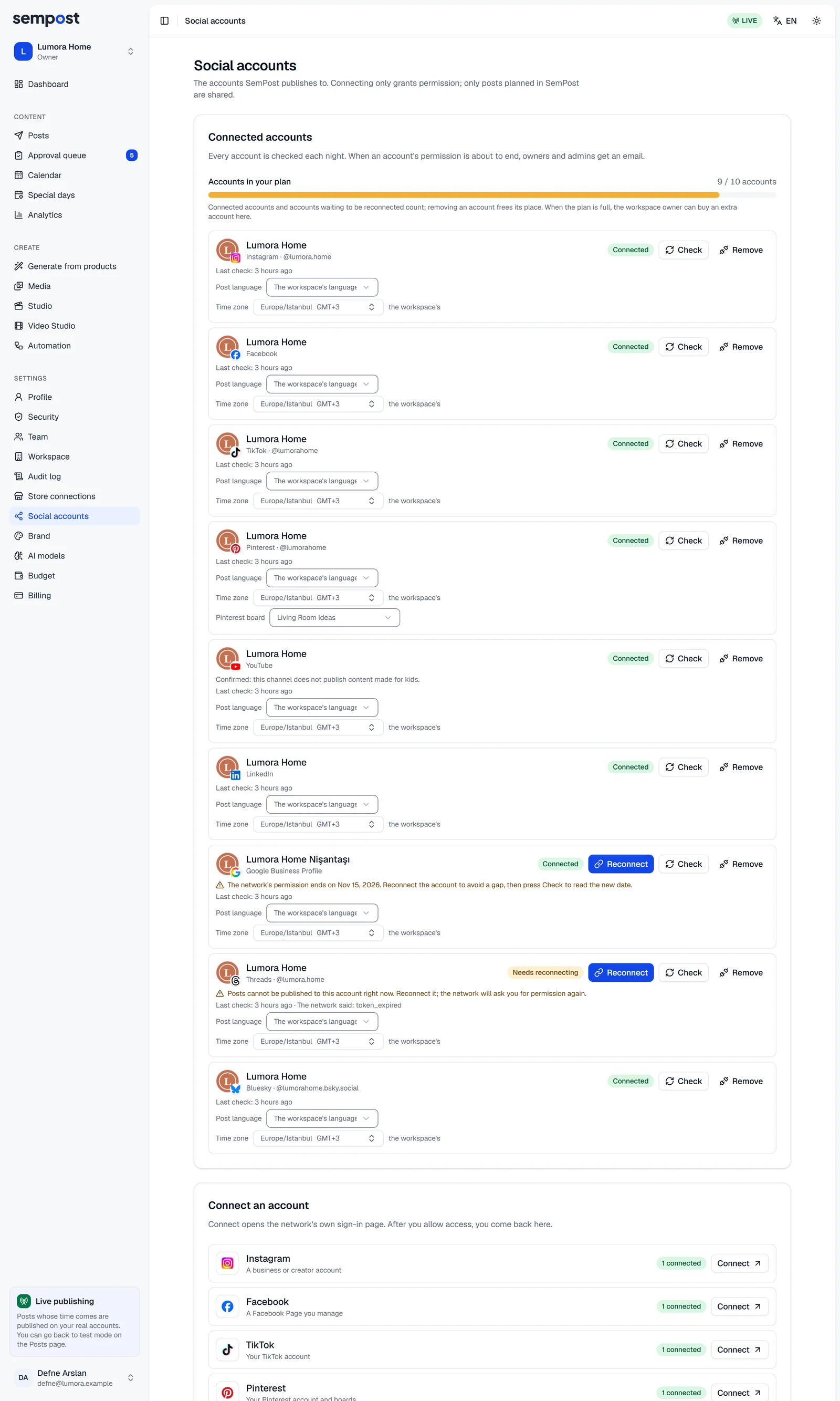
A network's permission doesn't last for ever: it can end on a set date, or the network can take it back. SemPost checks every connected account each night and warns you before a permission ends, so you can reconnect in time.
The nightly check
Each night SemPost asks every account's network whether the permission is still valid and the account can still be posted to. Under each account, Last check: says when that was and, after a problem, what The network said:.
To check now, press Check next to the account Editor: a notice says whether it's fine, and the details of a problem are under the account. An account that works again goes back to Connected.
When the permission has ended or the account can't be posted to, the account shows Needs reconnecting: Posts cannot be published to this account right now. Reconnect it; the network will ask you for permission again. This can also happen between two checks, when the network ends the connection.
Before a permission ends
Some networks give their permission until a set date. In the last seven days before it, a warning with the date shows under the account, with a Reconnect button, and owners and admins get one email: "The connection of … ends soon". Reconnect the account before that date and its posts go on without a gap.
Reconnect an account
Press Reconnect
In Settings › Social accounts, press Reconnect next to the account. The same dialog opens as when you connected it.
Sign in with the same account
Continue to the network, sign in with the same account and allow access again. If the network connects another account, SemPost adds it as a new account and leaves this one as it was.
Check the account
Back in SemPost, the account is Connected again, in its place, with its settings and its posts. If the warning about the permission's end date is still there, press Check: it reads the new date. Reconnecting works even when every account in your plan is in use.
Posts while an account needs reconnecting
- Planned posts stay planned. Reconnect before their time and they go out as planned.
- In live mode, a post whose time comes first fails with The account needs to be reconnected., and owners and admins get an email. Reconnect, then create the post again.
- Until you reconnect, you can't plan, approve or generate posts for the account: Posts cannot be published to this account right now. Reconnect it first.
- Automation rules leave the account out. If a rule's posts to it failed several times in a row, the rule shows it as Stopped: after reconnecting, press Resume next to it on the rule's card.
Remove an account
Press Remove next to the account and confirm with Remove account Admin. SemPost stops publishing to it, the connection at our publishing partner is deleted and the account's place in your plan is free.
- On the network nothing changes: your account and its published posts stay. You can also remove the app in the network's own settings.
- In SemPost, the account leaves the list and Analytics. Its posts stay in the post history. A post still planned for it fails at its time with The account is no longer available., and the Comment to DM of its posts stops.
- Connect the same account again within 7 days and it comes back as it was, with its settings and its Analytics history.
- LinkedIn's terms make SemPost delete what it got from LinkedIn, such as the account's name, profile picture and analytics, as soon as you remove the account. Connected again, a LinkedIn account starts without that history.
SemPost also removes accounts by itself, 48 hours after the free trial ends without a paid plan or after a plan closes. Their history stays, LinkedIn's apart, and comes back when you buy a plan and connect them again.
If something goes wrong
- There's no Reconnect button. Only owners and admins see it, on an account that needs reconnecting or whose permission ends within seven days.
- All … social accounts in your plan are in use. when you reconnect: the network sent back another account. Switch to the right account on the network first, as the dialog explains, then press Reconnect again.