Explanation
The exact credits before you start
How the summary counts the credits of a run, when they are reserved, what comes back when a product can't be made, and what changes the price.
Generate from products shows the exact credits of a run before it starts, in the Summary beside the steps (below them on a small screen). The total on the Generate button is what is reserved when you start, and the run never takes more.
What the summary counts
Each product is priced on its own, and the Total adds them up:
- Writing: one AI call per product writes the posts for all the accounts you picked, each for its network. It costs more with more accounts, and with more product photos for the AI to look at (up to four).
- Scene image: one AI scene per product, however many accounts you picked; each network's size is cut from it for free. With the Product photo style this line reads Product photo (free), and it does too when every account you picked is a Google Business Profile, which takes the product's own photo.
- Motion clip: one 5-second clip per product, when you switch it on for video posts.
The slideshow videos, the sizes for each network, collages, the text and labels drawn on the pictures and your logo are free, and so are scheduling and publishing. Available is your balance less the credits held for work that is still running.
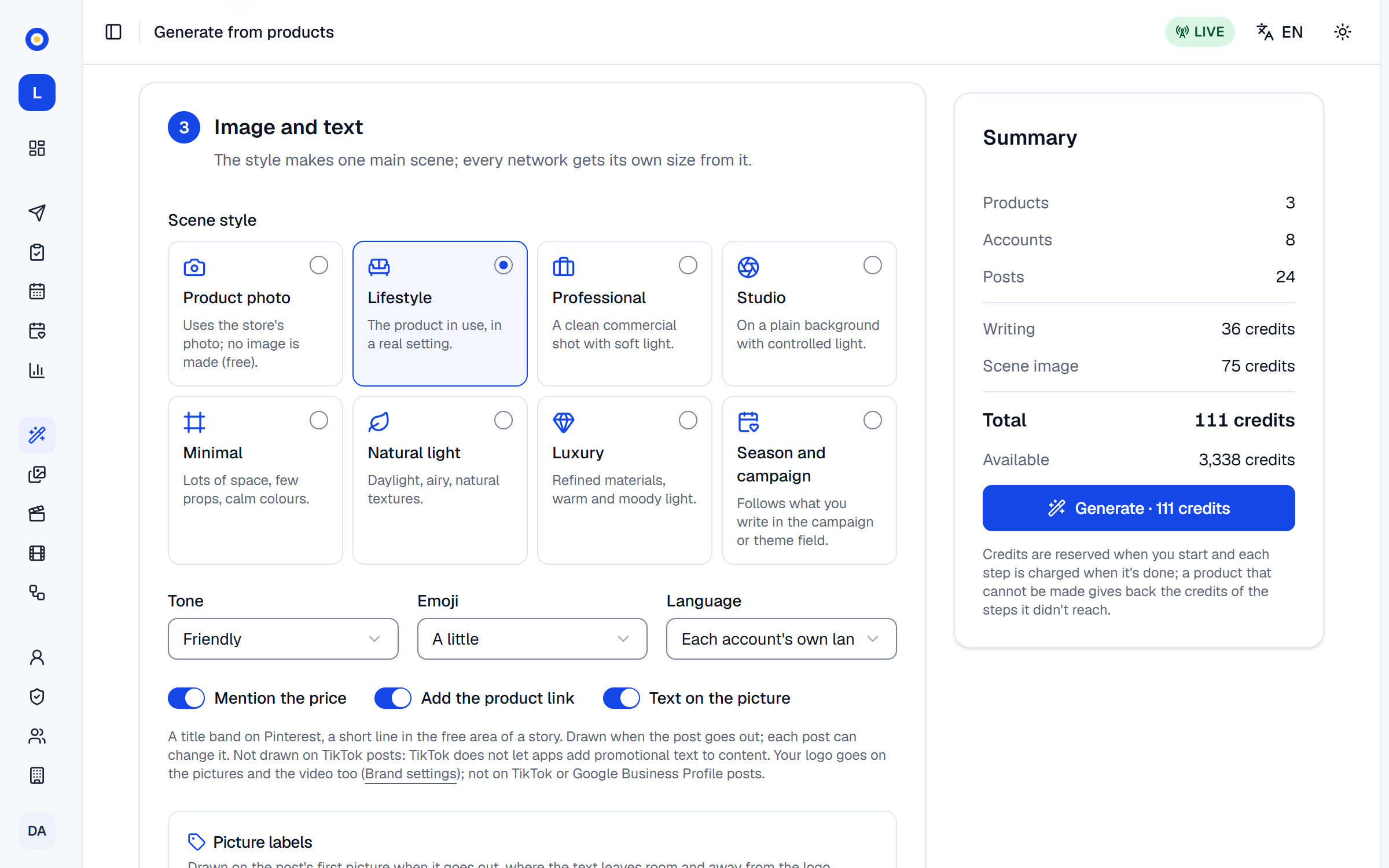
Only what changes the work changes the price: the products, the accounts and their content types, the scene style and the motion clip. The tone, the language, the labels, the price, link and picture-text switches, a campaign, an instruction or a discount code leave the total as it is.
When the credits are taken
Pressing Generate reserves the total, and Available drops by that much at once. Each step is charged when it's done. If a product can't be made, the credits of the steps it didn't reach come back; a step that was already done, such as the writing, stays charged. Try again on that product reserves only the steps that are left, at the price on the button. Cancel the waiting ones gives back everything reserved for the products that haven't started. Generating costs the same in test mode and live mode.
When credits run short
If the total is more than Available, the summary says You do not have enough credits for this. and the Generate button stays off. Make the run smaller (fewer products or accounts, Product photo, no motion clip), or press Get credits: it opens Settings › Billing, where the workspace's owner can buy credits or a bigger plan. Plans and credit packs are on the pricing page.
A run also doesn't start when it would go over the daily or monthly cap that admins and the owner can set in Settings › Budget. The summary says so before you press Generate, with what the cap leaves, for example Your daily credit budget leaves 30 credits for today, less than this job needs., and the button stays off. Budget settings opens that page.
The AI model sets the price
Each kind of work runs on the model chosen in Settings › AI models, where admins and the owner can pick a cheaper or a stronger one. The summary always prices the current choice. What each kind of work costs on the default model, and across the other models:
| Action | Credits | Other models |
|---|---|---|
| AI texts for one product's posts | 15 | 1–15 |
| An AI scene from your product photo | 22 | 15–54 |
| A 5-second motion clip | 40 | 40–300 |
| A voiceover of about 35 seconds | 4 | 3–4 |
| Ambient sound for a 20-second video | 60 | |
| Scheduling, publishing, analytics and slideshow videos | Free |
The writing line is for one product's posts on two accounts. Rewrite the text and New image on a generated post have their own price, shown before you confirm: see rewrite the text or make a new image.
If something goes wrong
- The price changed. Look at the new total before generating. Something changed the price after the summary was shown, such as the AI model. Nothing was taken: check the new total and press Generate again.
- This would go over the workspace's credit budget. Make the run smaller, or ask an admin to raise the cap in Settings › Budget.
- The workspace's plan is closed. Buy a plan on the Billing page to go on. Nothing that costs credits can start until the owner buys a plan in Settings › Billing.
- A step's result was lost. Contact support for a credit refund. This is rare. Write to [email protected] and name the product.