How-to guide
Fix a post a safeguard held
See why SemPost held an automation post as a draft, fix it by hand or have it rewritten, and send it on.
When a safeguard holds an automation post, the post waits in the Drafts tab of the Approval queue with the notice SemPost is holding this post as a draft and the reason. It doesn't go out, even when approval is off, until someone looks at it and sends it on.
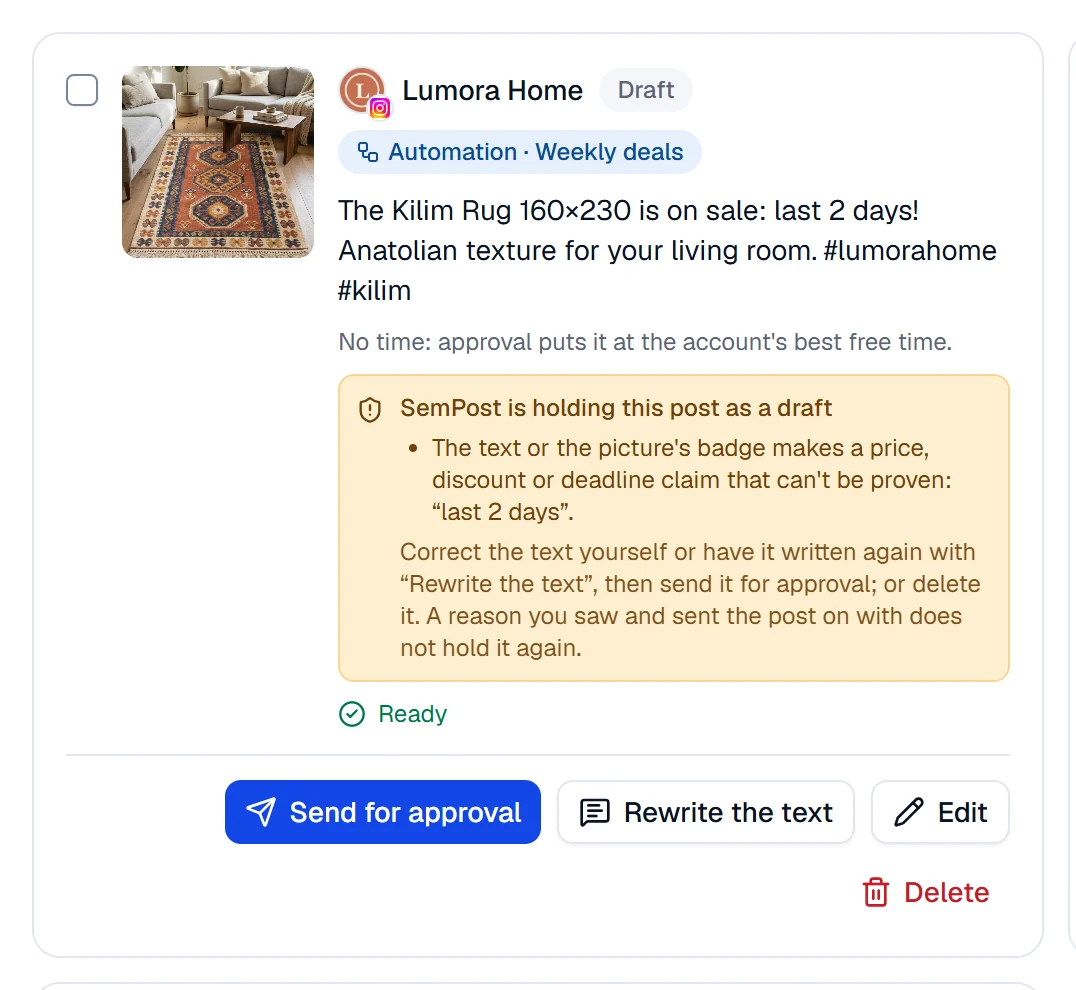
The reasons and what to do
| The card says | What to do |
|---|---|
| The text or the picture's badge makes a price, discount or deadline claim that can't be proven: “…”. | Take the words out with Edit, or press Rewrite the text. A badge can't be changed on the post: send the post on as it is or delete it, and change the rule's Badge for its next posts. |
| Another account on the same network got nearly the same text. | Press Rewrite the text for a clearly different version, or change the words yourself. |
| Just before sharing, the product couldn't be found in the store or was out of stock. | Check the product in your store. If it's for sale again, send the post on; if not, delete it. |
| The product's price changed: … → …. Check the price in the text and the picture. | Rewrite the text writes it with today's price, or correct the price yourself. A Price label on the picture still shows the old price: delete the post if that matters. |
| The discount code … doesn't work in the store now. | Take the code out of the text with Edit, or delete the post; a Discount code band on the picture still shows it. For the rule's next posts, change or remove the code in its Content step. |
Fix the post and send it on
Find the post
Open Approval queue › Drafts. To see only automation posts, choose Automation in All sources, then a rule.
Fix it
Edit changes the text, and on pins and stories the Text on the picture, for free. Rewrite the text has the AI write a new version; the window shows the price before you confirm. A title, such as a pin's, changes only with Rewrite the text.
Send it on
Press Send for approval; an admin or the owner then approves the post as usual. When your approval rule is None, the button says Plan and the post goes straight onto the plan, except on Pinterest and LinkedIn: their posts always go for approval, so the button still says Send for approval (see networks that always need a person).
What happens next
- Rewrite the text keeps to automation's rules on prices and uses the new price if the post was held for a changed one. The new text is checked again: a new claim or a near copy holds it again. The picture stays; automation drafts don't offer New image.
- After Edit, the notice stays until you send the post on. Your own edits aren't checked again: what you send on is your call.
- Once you send the post on, the reasons you saw don't hold it again. Just before it goes out, its product is read again, and a new reason, such as another price or the product gone, holds it again.
- The post keeps the time the rule chose; if that time has passed when you send it, it goes to the account's first free time.
- While the draft waits, the rule doesn't pick that product for that account again; once you delete the draft, it can.
If something goes wrong
- This post changed since you looked at it. Look at it again before approving. Someone changed the post while you were looking. The card now shows the latest version: check it and try again.
- This post cannot be changed in its current state. Someone else sent the post on or deleted it first; the list refreshes by itself.
- The price changed. Look at the new total before generating. The price of a rewrite changed. Nothing was taken; the window shows the new price.
- Not enough credits: this needs … credits and … are available. The owner can buy credits in Settings › Billing.